Free Blu-ray Player

Showing posts with label iphone. Show all posts

Friday, April 12, 2013

5 Best Free Video Player Apps for iPhone and iPad

Indeed playing videos on your iPhone and iPad can be a chore if you only make use of the native video player, because who has the patience to convert those videos into one of the few formats that iPhone and iPad play (i.e. mp4, m4v and mov)? Under such an occasion, searching an iPhone or iPad video player app in Apple Store will fully solve your headache of unable to play videos of all kinds on iOS devices. However, do you know which video player app is the best for your iPhone and iPad?

To avoid you looking for the best video player for iPhone/iPad in the thousands, right here I will share you 5 best video players for iPhone and iPad. Those all have the ability to play most of the standard video formats (including wmv, mkv, avi, mp4, flv, rmvb, etc.). Without any doubt, the following best iPhone iPad video player list is your golden ticket to freely watch movies, TV shows and more on your iPhone or iPad. Now get ready to juice up your gadget with those wonderful free video player apps? Go!

Top 5 media player apps for iPhone and iPad:


1. OPlayer Lite / OPlayerHD Lite

A really good video player for iPad and iPhone. OPlayer Lite plays almost all possible movie and audio file formats like AVI, WMV, MKV, FLV, MPG, MP4, Webm, VOB, MP3, WMA, WAV, OGG, FLAV, etc. Subtitles support is also available for free for hard and prerendered subs in SMI, ASS, SUB, SRT, TXT and many other formats. The play has also a multiple audio track support, so you can easily change your audio without any pauses. As for the interface it can be a bit difficult at the beginning, but you will need just a couple of minutes to make it clear. One more thing to mention is that Oplayer has a built-in browser with download feature so you can easily save the media you like.


Pros:
  • Most audio&video formats support 
  • Multiple audio track support 
  • Subtitles support 
  • Multiple language support
  • Ability to change aspect ratio
  • A built-in browser
  • A built-in downloader
  • Resume function
Cons:
  • Ads in Lite version
  • Complex interface


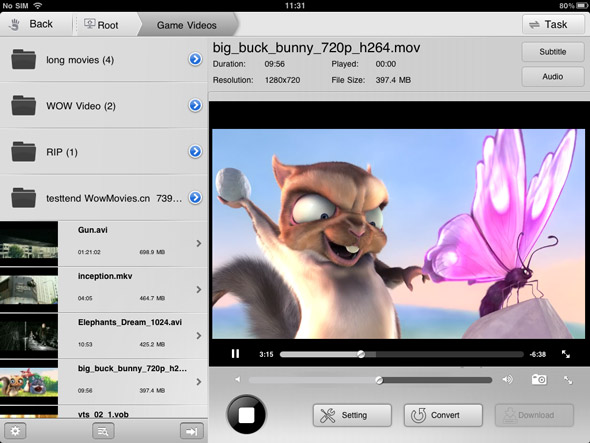
All in all, RockPlayer 2 is a more than decent free video player, supporting a wide variety of video files. With this app, you will have to transfer videos to your iPhone or iPad with the help of iTunes file transfer, HTTP, FTP or WebDAV. One of the standout features of RockPlayer2 is that it will effortlessly help you share videos between compatible devices. However, you may face a bit of hiccup when playback h.264 encoded videos. 

Pros
  • Support for subtitles and lossless audio
  • A lot of import/export options
  • Customizable gesture controls
  • Auto import for camera roll videos
Cons
  • Audio doesn’t work under lock screen or in the background
  • Choppy playback for 1080p videos


3. AirPlayit / AirPlayit HD

If you don’t plan to store your video library on your iPad, you should definitely take a look at AirPlayit. It’s one of the best and most effortless ways to stream videos from your desktop computer to your iPhone or iPad. Just download and install a small server application on your desktop computer, select the folders you wish to share over your network, and you’re good to go.

Pros:
  • No need to store video on iPad
  • Stream video directly from desktop
  • Support stream 1080p video
  • Support play DRM protected


4. Video Stream

Video Stream is not a conventional video player, but the features it offers make it worthy of appearing on this list. You can transfer videos to it via the usual iTunes method, and there is also a desktop server of its own that lets you stream videos of any format from your PC or Mac to your iPhone. The player works pretty well too, offering both landscape and portrait modes, along with support for background and lock screen play.


Pros
  • Full-screen mode 
  • Stream videos from your computer 
  • Convert any video to the default .MOV format from within the app 
Cons
  • Limit on streaming from desktop in the free version 
  • Struggles with some formats and large videos


5. VLC Media Player

VLC Player was hugely popular in its tenure in the App Store. Unfortunately, it was pulled from there due to copyright issues, and is now only available in the Cydia store. So if you have jailbroken your iOS device, this is a good news certainly.

The VLC Media Player is rather basic, but supports a wide variety of video types and it is even smart enough to warn you in case your device isn't capable of playing a file smoothly. The biggest downside is that you will have to transfer your video files to your iPhone or iPad using SSH.

Pros
  • Neat interface 
  • Compatibility warning for low-end devices 
Cons
  • Difficult method for importing videos (via SSH) 
  • Laggy on older devices

What free video player apps do you use to play back videos on your iPhone or iPad? Drop a line in the comments section below the article!

Saturday, February 2, 2013

Top 5 Photo Editing Apps for iPhone

Actually, I am not a great photographer and using a professional camera is away over my head. So in my daily life, I prefer to take use of my iPhone and some other favorite photo editing applications to record and show my daily life. There are so many iPhone photo-editing apps on App Store and I bet majority of you can not judge which one is good or not, just like me before. So today I will share you with 5 best photo editing apps for iPhone just in line with my personal experience. If you have an urgent need on photo editing app, you could read through my recommendations to pick up your favorite one and beautify your photos in everyday life. 


1. Instagram, Free 

For fans of social media, be sure to never miss out Instagram. No other photo app makes it so simple to share images socially. I deeply love that I can push a photo directly to Twitter, Facebook, Thumblr and Foursquare directly from Instagram rather than hunting and finding the photos with the other apps. The built in ability to apply filters and blurs can make you look like a pro! It is the most recommended photo editing app in this list.


2. Photoshop Express for iPhone, Free

Another recommendation and the one that I should include in my list: Photoshop Express. The professional editing that you can achieve with Photoshop Express may be also available in some other tools here, but its ease of use is quite awesome. With many effects at its disposal and the ability to share edited photos, this is actually a must-have for anyone who's serious about photography on mobile phones.


3. Camera+, $0.99

Another big name in camera replacement apps, Camera+ does much much more than just let you customize your photos. The app is vastly superior to Apple's built-in camera app, and includes tools that help you take better, faster photos. On the customization side, Camera+ does offer several photo borders, custom filters, and other personalization effects you can apply before or after saving your photo to your Camera Roll. As with other apps, you can layer effects and filters on top of one another, edit your photo, rotate it, crop it, and make it just right before you share it with the world. If you're looking for a complete camera app replacement for the iPhone or iPad, Camera+ is certainly the worthwhile one.


4. Snapseed, Free

Call Snapseed an Instagram competitor if you want! However, Snapseed's focus is on making your photos look fantastic and putting high-quality editing tools in your pocket, not necessarily on being social (although you can do that too.) Snapseed comes loaded with photo filters and personalization tools so you can give your shots that sepia, old-timey look, but it goes further than that. You can tweak and edit entire photos, or just sections of your photo that you'd like to clean up, use the Tune Image feature to tweak everything about your shot, or just hit Auto Correct and let the app handle everything.


5. Procamera, $2.99

Procamera is a nice alternative to Camera+. It’s a bit pricier but I like the immediacy of its interface a bit more than Camera+, which makes you wade through some attractive but unnecessary screens to get to some features. If you’re looking for an app to use when you’re whipping your phone out of your pocket to grab a shot quickly, Procamera has the edge. It also offers an unlinked focus/exposure system and White Balance locking to help you set your color tone.


Do you have any other iPhone photo editing apps that are great to use? Just share to me! Deep thanks! 
Related Posts Plugin for WordPress, Blogger...