

To avoid you looking for the best video player for iPhone/iPad in the thousands, right here I will share you 5 best video players for iPhone and iPad. Those all have the ability to play most of the standard video formats (including wmv, mkv, avi, mp4, flv, rmvb, etc.). Without any doubt, the following best iPhone iPad video player list is your golden ticket to freely watch movies, TV shows and more on your iPhone or iPad. Now get ready to juice up your gadget with those wonderful free video player apps? Go!
Top 5 media player apps for iPhone and iPad:

A really good video player for iPad and iPhone. OPlayer Lite plays almost all possible movie and audio file formats like AVI, WMV, MKV, FLV, MPG, MP4, Webm, VOB, MP3, WMA, WAV, OGG, FLAV, etc. Subtitles support is also available for free for hard and prerendered subs in SMI, ASS, SUB, SRT, TXT and many other formats. The play has also a multiple audio track support, so you can easily change your audio without any pauses. As for the interface it can be a bit difficult at the beginning, but you will need just a couple of minutes to make it clear. One more thing to mention is that Oplayer has a built-in browser with download feature so you can easily save the media you like.
- Most audio&video formats support
- Multiple audio track support
- Subtitles support
- Multiple language support
- Ability to change aspect ratio
- A built-in browser
- A built-in downloader
- Resume function
Cons:
- Ads in Lite version
- Complex interface

2. RockPlayer2
All in all, RockPlayer 2 is a more than decent free video player, supporting a wide variety of video files. With this app, you will have to transfer videos to your iPhone or iPad with the help of iTunes file transfer, HTTP, FTP or WebDAV. One of the standout features of RockPlayer2 is that it will effortlessly help you share videos between compatible devices. However, you may face a bit of hiccup when playback h.264 encoded videos.
- Support for subtitles and lossless audio
- A lot of import/export options
- Customizable gesture controls
- Auto import for camera roll videos
- Audio doesn’t work under lock screen or in the background
- Choppy playback for 1080p videos
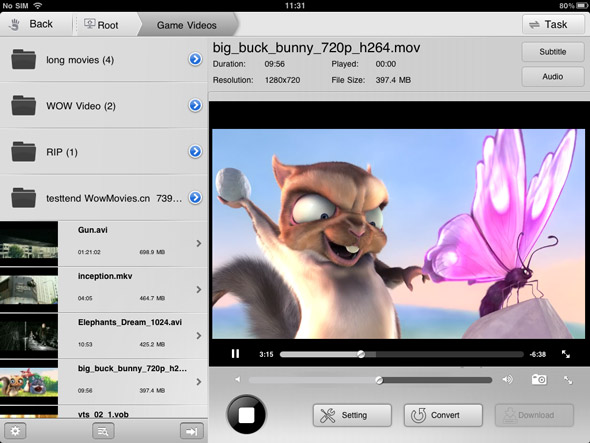
If you don’t plan to store your video library on your iPad, you should definitely take a look at AirPlayit. It’s one of the best and most effortless ways to stream videos from your desktop computer to your iPhone or iPad. Just download and install a small server application on your desktop computer, select the folders you wish to share over your network, and you’re good to go.
Pros:
- No need to store video on iPad
- Stream video directly from desktop
- Support stream 1080p video
- Support play DRM protected

4. Video Stream
Video Stream is not a conventional video player, but the features it offers make it worthy of appearing on this list. You can transfer videos to it via the usual iTunes method, and there is also a desktop server of its own that lets you stream videos of any format from your PC or Mac to your iPhone. The player works pretty well too, offering both landscape and portrait modes, along with support for background and lock screen play.
Pros
- Full-screen mode
- Stream videos from your computer
- Convert any video to the default .MOV format from within the app
- Limit on streaming from desktop in the free version
- Struggles with some formats and large videos

VLC Player was hugely popular in its tenure in the App Store. Unfortunately, it was pulled from there due to copyright issues, and is now only available in the Cydia store. So if you have jailbroken your iOS device, this is a good news certainly.
The VLC Media Player is rather basic, but supports a wide variety of video types and it is even smart enough to warn you in case your device isn't capable of playing a file smoothly. The biggest downside is that you will have to transfer your video files to your iPhone or iPad using SSH.
Pros
- Neat interface
- Compatibility warning for low-end devices
- Difficult method for importing videos (via SSH)
- Laggy on older devices

