Free Blu-ray Player

Showing posts with label iPad. Show all posts

Friday, April 12, 2013

5 Best Free Video Player Apps for iPhone and iPad

Indeed playing videos on your iPhone and iPad can be a chore if you only make use of the native video player, because who has the patience to convert those videos into one of the few formats that iPhone and iPad play (i.e. mp4, m4v and mov)? Under such an occasion, searching an iPhone or iPad video player app in Apple Store will fully solve your headache of unable to play videos of all kinds on iOS devices. However, do you know which video player app is the best for your iPhone and iPad?

To avoid you looking for the best video player for iPhone/iPad in the thousands, right here I will share you 5 best video players for iPhone and iPad. Those all have the ability to play most of the standard video formats (including wmv, mkv, avi, mp4, flv, rmvb, etc.). Without any doubt, the following best iPhone iPad video player list is your golden ticket to freely watch movies, TV shows and more on your iPhone or iPad. Now get ready to juice up your gadget with those wonderful free video player apps? Go!

Top 5 media player apps for iPhone and iPad:


1. OPlayer Lite / OPlayerHD Lite

A really good video player for iPad and iPhone. OPlayer Lite plays almost all possible movie and audio file formats like AVI, WMV, MKV, FLV, MPG, MP4, Webm, VOB, MP3, WMA, WAV, OGG, FLAV, etc. Subtitles support is also available for free for hard and prerendered subs in SMI, ASS, SUB, SRT, TXT and many other formats. The play has also a multiple audio track support, so you can easily change your audio without any pauses. As for the interface it can be a bit difficult at the beginning, but you will need just a couple of minutes to make it clear. One more thing to mention is that Oplayer has a built-in browser with download feature so you can easily save the media you like.


Pros:
  • Most audio&video formats support 
  • Multiple audio track support 
  • Subtitles support 
  • Multiple language support
  • Ability to change aspect ratio
  • A built-in browser
  • A built-in downloader
  • Resume function
Cons:
  • Ads in Lite version
  • Complex interface


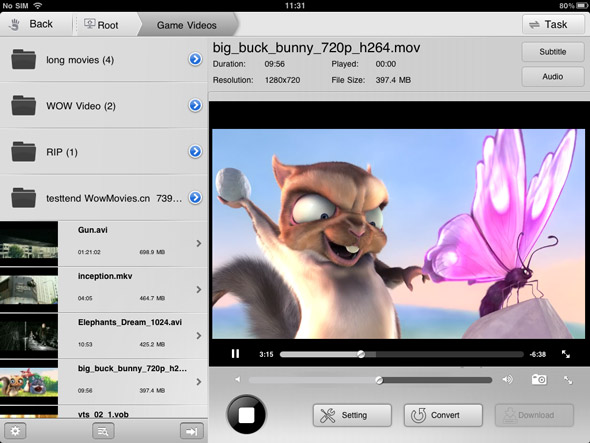
All in all, RockPlayer 2 is a more than decent free video player, supporting a wide variety of video files. With this app, you will have to transfer videos to your iPhone or iPad with the help of iTunes file transfer, HTTP, FTP or WebDAV. One of the standout features of RockPlayer2 is that it will effortlessly help you share videos between compatible devices. However, you may face a bit of hiccup when playback h.264 encoded videos. 

Pros
  • Support for subtitles and lossless audio
  • A lot of import/export options
  • Customizable gesture controls
  • Auto import for camera roll videos
Cons
  • Audio doesn’t work under lock screen or in the background
  • Choppy playback for 1080p videos


3. AirPlayit / AirPlayit HD

If you don’t plan to store your video library on your iPad, you should definitely take a look at AirPlayit. It’s one of the best and most effortless ways to stream videos from your desktop computer to your iPhone or iPad. Just download and install a small server application on your desktop computer, select the folders you wish to share over your network, and you’re good to go.

Pros:
  • No need to store video on iPad
  • Stream video directly from desktop
  • Support stream 1080p video
  • Support play DRM protected


4. Video Stream

Video Stream is not a conventional video player, but the features it offers make it worthy of appearing on this list. You can transfer videos to it via the usual iTunes method, and there is also a desktop server of its own that lets you stream videos of any format from your PC or Mac to your iPhone. The player works pretty well too, offering both landscape and portrait modes, along with support for background and lock screen play.


Pros
  • Full-screen mode 
  • Stream videos from your computer 
  • Convert any video to the default .MOV format from within the app 
Cons
  • Limit on streaming from desktop in the free version 
  • Struggles with some formats and large videos


5. VLC Media Player

VLC Player was hugely popular in its tenure in the App Store. Unfortunately, it was pulled from there due to copyright issues, and is now only available in the Cydia store. So if you have jailbroken your iOS device, this is a good news certainly.

The VLC Media Player is rather basic, but supports a wide variety of video types and it is even smart enough to warn you in case your device isn't capable of playing a file smoothly. The biggest downside is that you will have to transfer your video files to your iPhone or iPad using SSH.

Pros
  • Neat interface 
  • Compatibility warning for low-end devices 
Cons
  • Difficult method for importing videos (via SSH) 
  • Laggy on older devices

What free video player apps do you use to play back videos on your iPhone or iPad? Drop a line in the comments section below the article!

Sunday, July 22, 2012

Top 5 Widespread Gadgets for Apple Haters

1. Best iPhone 4S Alternative: Samsung Galaxy S III
As the newest flagship smartphone created by Samsung, the Galaxy S3 is released to certain international market on May, 2012, which comes fully loaded with Android 4.0 Ice Cream Sandwich,  4.8-inch HD Super AMOLED display with 1,280x720 pixel resolution, 4G LTE capability, a zippy dual-core processor, a strong 8-megapixel camera and tones of internal memory and 2GB RAM. Most importantly, the handset's price is quite compelling.
Pumped with high-performing hardware and creative software features, the Samsung Galaxy S3 is an excellent, top-end phone that is neck and neck with the Apple iPhone 4S.
2. Best iPad Alternative: Google Nexus 7
As for the biggest competitor for currently well-liked iPad and Amazon Kindle Fire, Google Nexus 7 delivers a premium design with only Wi-Fi connection and is powered with Google’s excellent Android 4.1 Jelly Bean Software, 1.3GHz quad-core Nvidia Tegra 3 processor, a 1280 x 800 IPS capacitive touchscreen. When holding this 7-inch tablet at hand, you will find it is pretty easy for you to carry it around in your pocket or purse. Furthermore, this smart tablet device offers easy access to Google’s Play Store for you to obtain various media contents, including magazines, movies, TV shows, games and e-Books.
3. Best iPod Touch Alternative: Samsung Galaxy Player 4.2
As the latest Samsung offering among Android media player lineage, Galaxy Player 4.2 looks more like a phone featuring a larger screen than iPod touch (4.2 inches versus 3.5 inches), a much better sound due to the combination of front-facing speakers and SoundAlive technology, a pair of cameras allowing you to capture your beloved scenery and a expandable memory letting you store more media files. Besides, you can directly access to Google Play Store for multi-media entertainment.

4. Best iPod Nano Alternative: MotoActv
When you check out the rundown of what’s inside this watch-like music player that is based on Google Android operating system, you will clearly know why MotoActv is more attractive than iPod NANO.
1.       Perfect sound quality for music listening
2.       A 1.6-inch touchscreen which is slightly bigger than the nano
3.       built-in GPS for tracking running, cycling, golf and more
4.       Wi-Fi connection for wireless syncing
5.       Bluetooth 4.0 with ANT+ compatibility
6.       FM radio for killing your free time while running
7.       Lengthy battery life for long runs/ rides

5. Best MacBook Pro with Retina Display Alternative: Samsung Series 7 Chronos

Samsung’s Series 7 Chronos is a full-featured portable machine at a much lower price than MacBook Pro. Although it looks more like a clone for MacBook Pro, this Windows 7 powered 17-inch laptop delivers us a big surprise for just selling at $1,000, which packs a full HD matte screen along with a lot more storage than the MacBook Pro (1 TB versus 256 GB). The sleek aluminum Series 7 also packs a quad-core Core i7 processor, 8GB of RAM, and Nvidia GeForce GT 650M graphics with a DVD-ROM included!

Related Posts Plugin for WordPress, Blogger...